• 1. Log in.

    Choose your preferred device—computer or mobile. The steps are the same.

  • 2. Click Document Center.

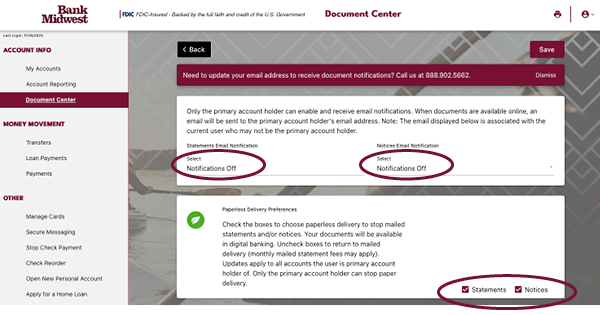
    Find Document Center in the left navigation menu. Select the Delivery Preferences option.

  • 3. Email notifications.

    Primary account owners can sign up to receive email alerts as soon as new statements and notices are ready to view. Account and loan notifications are two separate options so be sure to select your email for both. Stay up to date—no need to log in to check.

  • 4. Opt in to paperless delivery.

    Manage your paper delivery preferences. Primary account owners can opt in or out of receiving mailed account statements plus important account and loan notices. Opt in to paperless for statements or notices. To choose paperless for both types, mark each box.

    Note: Choose paperless to avoid monthly paper statement fees for select accounts.

What kind of account documents are online?

In addition to monthly and quarterly bank statements, important account and loan notices also available to view or download in the Document Center.

  • Deposit account notices include non-sufficient funds, CD renewal and address change notices to name a few.
  • Loan notices include billing notices (invoices), maturity, past due and end of year statements. HELOC statements are also now available in the Document Center.

Be sure to opt in for email notifications to receive timely alerts when these are issued.

Why are print statements still being mailed to me?

Only primary account holders can choose paperless delivery (or elect to stop paper statements from being generated). If you have questions about who the primary owner is, please contact our Customer Support team at 888-902-5662.

When are documents issued?

Typically, bank statements are generated the first of every month. Online notices are issued according to the same schedule or account activity as their print counterparts.

Skip to content